ChatGPT Remembers You Now. Who Owns That Memory?
The old complaint about ChatGPT was that it forgot you every session. That complaint is dead. In 2026, ChatGPT's memory is automatic, continuous, and good. So the question worth asking has changed. It is no longer "does my assistant remember me" but "who holds what it remembers." The short answer: OpenAI holds ChatGPT's memory of you, in its cloud; you can view and edit a summary that does not include everything it remembers; the data-export docs do not list the memory summary as included; and how much memory you get is tiered by plan. That answer comes from going through OpenAI's own help pages, pricing pages, and privacy policy. Each claim about OpenAI below links to the page it comes from, re-checked on October 18, 2026.
What ChatGPT memory actually does in 2026
Credit first, because the system deserves it. When memory is enabled, ChatGPT keeps a memory summary. In the words of OpenAI's Memory article (last updated September 2026), improved memory "continually updates a broader summary of relevant context." Depending on your plan and region, that context can come from past chats, saved memories, custom instructions, files in your Library, and connected apps (outside services like Gmail that you have linked to your account). You do not maintain it. It maintains itself. The older system, a list of individual saved memories, is now called legacy, and where the option exists you can switch back to it. You can view the summary, type corrections into it, tell ChatGPT not to mention something again, or delete it, which also turns Memory off. The controls sit under Settings > Personalization > Memory, though the article notes they vary by plan, region, and platform.
It goes further than the summary. Projects have their own memory: OpenAI's docs say a project can use its chats and files as context for future responses. A project-only memory setting keeps that context inside the project: chats in it cannot reference conversations outside it, and chats outside cannot reference it. Scheduled tasks run on a timer, and on Plus, Pro, Business, Enterprise, and Edu plans (not Free or Go) they can react to events, like a Gmail message or a GitHub pull request. ChatGPT Work handles longer multi-step jobs, and its cloud browser runs remotely, on ChatGPT's own computer rather than yours, which means, in the docs' own words, a task "can continue in the background, including after you close your computer." In the desktop app, Work can even use local files (files on your own machine) and desktop apps with your permission.
That is a genuinely strong memory system. If someone tells you ChatGPT forgets everything, they have not used it recently. The honest questions start after you accept all of that.
Question one: can you see all of it?
The FAQ in OpenAI's Memory article answers this directly. Asked whether the memory summary includes everything ChatGPT remembers, its answer is "No." The summary is a high-level view that "may omit details that are less relevant, unsuitable for the summary, or derived from sources that are not displayed individually." Project memory is less visible still: the Projects article says it "does not show a list of memories like personal memory." Sources, which can appear below a response, help you review which past chats, saved memories, files, or emails personalized an answer, but the Memory article notes they "may not show every factor that shaped a response."
Deletion has the same shape. To remove something saved as a memory, the article says to delete the saved memory and the chat where you first shared it, then remove it from every other source where it appears: the memory summary, saved memories, regular and archived chats, files in your Library, and connected apps. Even then, OpenAI "may retain logs of deleted saved memories for up to 30 days for safety and debugging purposes." Turn memory off and back on, and ChatGPT may create new remembered information from whatever chat history remains. So you can edit what ChatGPT shows you it knows. What it knows and what it shows you are, by OpenAI's own description, not the same set.
Question two: can you take it with you?
ChatGPT has a real data export, meaning a downloadable copy of your account data: Settings > Data controls > Export data, or a request through OpenAI's Privacy Portal. It can take up to 7 days to arrive, and the download link expires 24 hours after you receive it. The export docs say the ZIP "includes your chat history and other relevant account data." Custom instructions are explicitly confirmed as included. Scheduled tasks are explicitly confirmed as not included; the scheduled tasks article says so. And the memory summary is not listed at all. OpenAI's data-export docs do not say your memory ships in the export. Chat history does. On Business and Enterprise plans, self-service export is not available; the docs send you to your workspace owner.
Portability is narrower still. The only transfer OpenAI documents is uploading exported conversations into a chat in another personal ChatGPT account, where they serve as a reference file. That article says the upload does not move memories, settings, or GPTs to the other account. The docs describe no way to move ChatGPT's memory of you to another model or another provider. To be precise about what that means: this is absence in the documentation, not proof of impossibility. But if a path existed, you would expect the company to document it, and as of October 2026 it does not.
Question three: how much memory does your plan buy?
Memory depth is a pricing axis. OpenAI's own pricing page tiers it (a tier is a pricing level with its own feature set), in these exact words:
| Plan | Price (USD) | Memory, per OpenAI's pricing pages |
|---|---|---|
| Free | $0 | "Limited memory and context" |
| Go | $8/month in the US (localized in some markets) | "Longer memory" |
| Plus | $20/month | "Expanded memory and context" |
| Pro | $100, $200, or $500/month (three usage tiers) | "Maximum memory and context" |
| Business | $20/user/month annual, $25 monthly (Standard seat; Premium seats cost more) | "Expanded"; memory with past chats listed as coming soon |
Prices are OpenAI's US-dollar figures as of October 18, 2026; the pricing page shows local currency in many countries. Read that memory column again. How well your assistant remembers you is a function of what you pay this month. Stop paying, and your memory drops a tier with you. The pricing page adds one more detail worth knowing: memory shares the context window (the fixed amount of text a model can consider at once) with your actual input, along with system instructions and internal processing. Memory of you competes for space with the thing you are currently asking.
Question four: where does it live?
Most of the memory-touching features in OpenAI's docs, the memory summary, project memory, the cloud browser, and Work on web and mobile, run in OpenAI's cloud, not on hardware you control. The Memory article talks about deleting remembered information "from OpenAI systems," and OpenAI's privacy policy lists memories among the information it retains until you delete it. The documented local surface is the desktop app, where Work can use local files with permission and local chats run on your computer. That is worth crediting. But the same Work article adds that "messages and task context may be stored in the cloud, even when work runs locally." Even there, the assistant and its memory of you live on OpenAI's side. None of the help pages linked here describes a local or self-hosted deployment of ChatGPT or its memory, or a way for an agent on your own machine to read what ChatGPT remembers about you. There is not even an API for custom instructions; the custom instructions FAQ says plainly, "There will be no API for custom instructions."
None of this is a scandal. It is the normal shape of a cloud product. It just means the memory is theirs to render, theirs to tier, and theirs to keep.
The other shape: memory as files you own
There is a second way to build an assistant that remembers you, and it is the one we teach. The memory is plain text files on your own machine. An instruction file describes who you are and how you like to work; the assistant reads it at the start of every session. Memory files hold what it has learned: decisions, preferences, project state; it writes to them as you go.
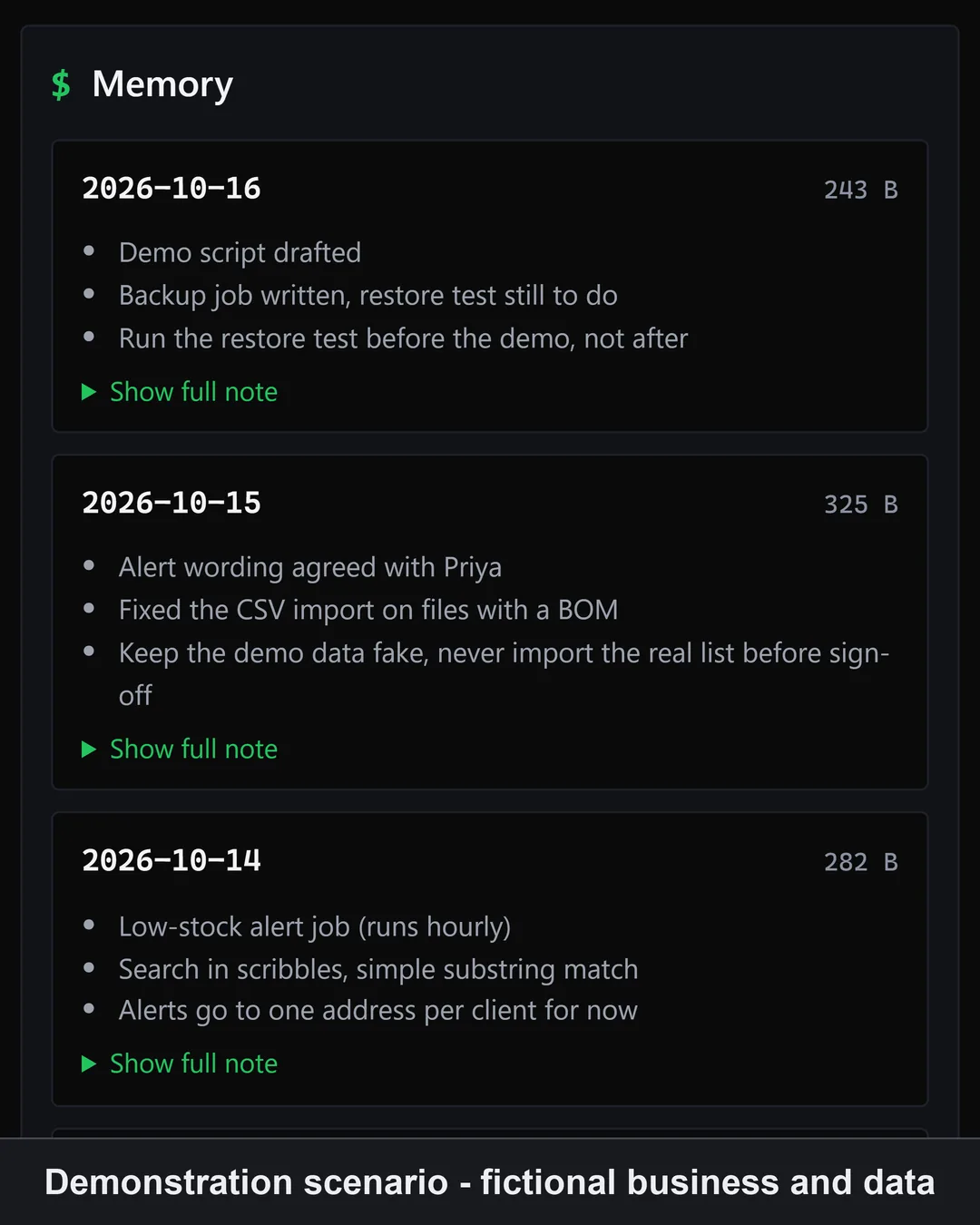
The properties fall out of the substrate. You can open every file in a text editor and read all of it; there is no summary view deciding what is appropriate to show. You can edit any line directly. You can copy the folder to a new machine, back it up, or put it under version control. And because the files are just text, they are not welded to one vendor: point a different model at the same files and it knows you on the first message. Memory bounded by your disk, not your plan. Agentic tools like Claude Code and OpenCode already work this way out of the box, and you do not need to be a developer to run them. If you are weighing the wider market of memory products against building, the buy-or-build guide covers that decision on its own.
Which one should you keep?
Honestly: maybe ChatGPT. If you want zero setup, polish, and a memory that maintains itself, ChatGPT's tradeoff is a reasonable one, and nothing above should scare you off it. Keep it, glance at your memory summary now and then, and know that the export is documented to cover your chats, not the memory itself.
Ownership matters for a different reader. You want to read everything your assistant knows about you, not a curated view. You expect to switch models as they leapfrog each other, and you want your accumulated context to survive the move. You are building something over years and do not want its memory rented by the month. If that is you, the file-based shape is not a compromise; it is the point. It costs effort ChatGPT does not: you install tools, follow instructions, and make decisions while your agent does the technical work. That effort buys you a memory nobody can tier, summarize, or hold.
New to agents entirely? Start with the free primer. Ready to build the assistant whose memory is yours? Level 1 builds the file-based system end to end, no coding required. Not sure it fits: the compare page covers what Dark Factory is not.
Level 1 is $79 one-time, covered by the 30-day Read Before You Build guarantee.